TP-Link Tether
- 4.7
- Rating
- 50.00M
- Installs
- Free
- Price

 Analysis by App-foxy
I use TP-Link Tether as the control point for compatible TP-Link networking equipment, and its appeal is easy to understand: instead of opening a browser, finding a device address, and working through a desktop-style settings page, I can manage the network from a phone. That makes it a practical tools app for everyday home networking, especially when I need to check a router, adjust a setting, or help someone else troubleshoot from the same room.
The important qualification is that Tether is not a universal network manager. Its usefulness depends on having compatible TP-Link hardware, and the exact controls available can vary with the device. I would not install it expecting to configure every brand of router or replace a full network administration suite. I see it as a companion for TP-Link equipment: convenient when the match is right, limited when it is not.
What using Tether feels like in ordinary home networking
My first impression is that the app is designed around reducing friction. A router's web interface can be powerful, but it often feels like a small control panel designed for a desktop screen. Tether puts the common management experience on a phone, which is useful when the router is in another room or when I am helping a family member who does not want to deal with technical menus.
You May Also Like

 Blood Strike: 2.5 Anniversary
Blood Strike’s Loadouts Turn Every Drop Into a Tactical Gamble
A close look at Blood Strike’s custom loadouts: how fast access to signature weapons reshapes its battle royale rhythm, rewards preparation, and narrows the gap between fights.

 Pandora - Music & Podcasts
Pandora’s Music Is Easy to Start, but Harder to Recover
Pandora’s strength is its low-effort path from a seed to a station. Its weak spot is how much confidence it asks you to place in connection, setup, and quiet recovery.

 8 Ball Pool
 Is Built on Rivalries, Rematches, and Routine
A close look at the rivalries, rematches, shared routines, and unanswered safety questions that turn a quick pool match into a persistent mobile community.

 Samsung Music
’s Quiet Strength Is Playing What You Already Own
Its reach comes less from spectacle than from dependable access to a personal library. That simplicity is both the app’s strongest retention engine and its ceiling.

 AccuWeather: Weather Radar
AccuWeather Review: A Quick, Clear Forecast for Everyday Decisions
For everyday plans, the best forecast is the one you can understand quickly. AccuWeather makes rain timing, radar, and local conditions easy to act on, with a few trade-offs.

 Hill Climb Racing
Why Hill Climb Racing Still Turns Crashes Into One More Run
A tiny car, a bumpy hill and one more upgrade: Hill Climb Racing keeps resurfacing because its simple chaos makes every near-miss feel personal.
More From Our News Desk



A realistic example is a slow evening connection. Rather than immediately blaming the internet provider, I can use the app to inspect the TP-Link device and work through the available management options. If the issue is local to the router or wireless network, having those controls close at hand is more convenient than searching for a laptop, connecting to the right network, and remembering the device's administration address.
That convenience also helps during setup changes. If I replace a phone, add a new household device, or need to review the network after moving the router, a mobile control app is easier to reach than a printed manual. I still need to understand what I am changing, but the app lowers the effort required to get to the relevant screen.
TP-Link SYSTEMS INC. has positioned Tether in the Tools category, and that description fits better than calling it a general internet app. It is not intended for browsing, speed testing as its main purpose, or managing unrelated smart-home products. Its job is narrower and more useful: provide access to compatible TP-Link networking hardware through a mobile interface.
Trust starts with the hardware relationship
For me, trust here begins with a simple question: am I using the official companion for the equipment I own? Tether is developed by TP-Link SYSTEMS INC., which makes the app's purpose clear. That is preferable to relying on an unfamiliar third-party utility that asks me to discover and control a router without an obvious connection to the manufacturer.
That does not mean I would grant the app unlimited confidence automatically. A manufacturer app can be convenient, but I still pay attention to the sign-in flow, device discovery, prompts, and any request to connect services. The safest habit is to read each screen instead of tapping through setup on autopilot. In particular, I would verify that the hardware shown in the app is mine before changing network settings.
The app has been available since July 23, 2013, and its long presence is one reason it is familiar to many TP-Link owners. Its current version is 4.14.4, while Android support starts at version 7.0. That makes it accessible to many older Android phones, although compatibility with the phone alone does not guarantee that every TP-Link device will expose the same controls.
Its broad adoption is visible in the store figures: it has passed 50 million installs, holds a 4.7 average from around 829 thousand ratings, and has about 21 thousand written reviews. I treat those numbers as evidence that the app is widely used, not as proof that every model or household experience will be identical. Networking products differ considerably, so the model in my home matters more than popularity alone.
Controls are useful, but device compatibility comes first
The most important check before installing is whether the router or networking product is supported. Tether's name may be recognizable, but recognition does not remove the need to confirm compatibility. If my equipment is from another manufacturer, this app is not the right control panel. If I own several TP-Link products, I would also check which one the app is meant to manage rather than assuming every device will appear with the same level of access.
This is one of the app's main trade-offs. A manufacturer-specific tool can present settings in a more approachable way because it knows the product family. The downside is that it cannot offer the broad, mixed-brand visibility of a dedicated network scanner or an advanced router-management platform. For a single-brand home setup, that specialization is an advantage. For a mixed network, it can leave gaps.
I also recommend keeping the router's original administration method available. A mobile app is excellent for quick access, but a browser interface may still be better for detailed configuration, unusual troubleshooting, or settings that are not surfaced in the mobile experience. Tether should make routine management easier, not become the only way I know how to reach my own equipment.
One practical tip is to use the app when I am physically connected to the correct home network during initial setup or troubleshooting. That reduces confusion when multiple networks are visible nearby. If the app cannot find the device, I would first check the phone's connection, the router's status, and whether the model is supported before assuming the app itself is broken.
Where data sensitivity matters most
Network-management apps deserve more attention than ordinary utilities because they sit close to the home connection. The sensitive moments are not limited to opening the app. They include adding a device, changing wireless details, reviewing connected equipment, and linking any optional account or service. Those actions can affect everyone using the network, so I treat them as administrative decisions rather than casual taps.
I would read the permissions and privacy explanations shown by the current app and operating system at installation and whenever a new feature asks for access. I do not assume that a permission is harmless simply because the app is made by a familiar company. I also avoid approving a request that does not make sense for the task I am trying to complete. When a choice is optional, I prefer to leave it off until I understand the benefit.
Another sensible habit is to avoid sharing screenshots from the management interface without checking them first. Network names, device labels, and connection details can reveal more about a household than expected. If I am asking for help in a forum or sending an image to a friend, I would crop or obscure anything that identifies my home network or connected devices.
Account controls deserve the same care. If Tether presents a choice between local management and an account-based feature, I would consider whether remote access is genuinely useful to me. Managing a router while at home is a different situation from reaching it away from home. I would choose the narrower option when it covers my needs, and I would use a strong, unique password for any account I decide to create.
The app includes in-app purchases ranging from $2.99 to $159.99 per item. That is a detail I would keep in mind before approving any optional purchase flow. The app itself is free, but “free to install” does not mean every related feature or service is necessarily free. I would inspect the purchase screen carefully, confirm what is being offered, and avoid treating a prompt as part of basic router management unless the wording makes that clear.
How much control do I really have?
Good network software should let me make deliberate choices instead of hiding important actions behind vague buttons. Tether is most useful when I use it as a guided control surface: I review the selected device, read the explanation beside a setting, and only then apply a change. That approach is especially important for wireless credentials or access-related settings, because an apparently small adjustment can disconnect phones, televisions, cameras, and work computers.
I would make one change at a time and wait to see its effect. This is a simple but valuable workflow. If I alter several settings together and the network becomes unstable, I have no clear way to identify the cause. With a mobile app, it is tempting to move quickly because the interface feels approachable; slowing down protects me from turning convenience into confusion.
Labels are another overlooked part of user agency. If the app shows connected devices, meaningful names can help me recognize them, but I would not label something “unknown” as a threat without checking first. A television, printer, streaming box, or guest phone may appear unfamiliar when a household has many devices. I prefer to identify equipment through its owner and purpose before taking action.
For guests, I would use the least disruptive option available on the compatible router rather than changing the main network. Separating visitors from household devices is generally a better workflow when the hardware supports it, but I would confirm the exact choices shown for my model. The important point is to avoid handing out the primary wireless credentials simply because that is the quickest route.
I also keep recovery in mind. Before applying a major change, I make sure I know how I will reconnect and where the router's physical reset or alternative administration method is. A phone app cannot help much if the phone is disconnected and I have not recorded the new details. This is not a criticism unique to Tether; it is the basic discipline required whenever a mobile interface controls the network that the mobile device depends on.
Where Tether is stronger than usual alternatives
Compared with the usual alternative of opening a router's web interface, Tether is more comfortable for quick household tasks. A phone is already nearby, the screen is built for touch, and the app's purpose is limited to TP-Link equipment. For someone who finds browser-based router pages intimidating, that focused approach can make basic management feel less like technical maintenance.
Compared with a generic network-scanning app, Tether has a different strength. A scanner may help identify devices or inspect a network from a broader perspective, but it is not necessarily the manufacturer's route for changing router settings. Tether is better when my goal is to manage the TP-Link device itself rather than simply observe what is connected.
Compared with a full desktop administration tool, the app is likely to feel lighter and faster for routine actions, while the desktop route remains preferable for complex work. I would choose Tether for checking the home setup, making a straightforward adjustment, or helping another person remotely by talking them through visible screens. I would choose the browser or a more advanced tool when I need detailed diagnostics, multi-vendor visibility, or settings the mobile interface does not expose.
The comparison changes again for people who use mesh systems, access points, or several generations of TP-Link hardware. A single app can simplify a mixed TP-Link home, but I would not assume that the experience is identical across product lines. The safest expectation is “convenient management where supported,” not “complete control of every TP-Link product.”
Small frictions that affect the experience
The first friction is the dependency on the device ecosystem. If I move away from TP-Link hardware, Tether becomes much less useful. That sounds obvious, but it matters when choosing a long-term network-management approach. A universal tool may be a better investment for someone who frequently changes brands or manages networks for several households.
The second is the risk of confusing app access with internet access. The router can be reachable locally even when the internet connection is down, and the reverse situation can create its own confusion. When troubleshooting, I separate those questions: can my phone communicate with the TP-Link device, and is the wider internet service working? That distinction prevents me from blaming the app for an outage outside the router.
The third is the possibility of overconfidence. A friendly mobile interface can make advanced settings look safer than they are. I would not change security-related or connection-related options without noting the original value first. If a setting is unclear, I would leave it alone and use the documentation for the specific hardware rather than guessing from a similarly named option.
There is also the practical issue of phone dependence. If my phone battery is empty, the app is unavailable, or the phone is not compatible with the required Android version, I need another route into the router. This is why I see Tether as a convenience layer, not a replacement for knowing the basic administrative details of my network.
Who should install it, and who should skip it?
I would recommend Tether to a person who owns compatible TP-Link networking equipment and wants a simpler way to handle routine home administration. It is particularly suitable for families where one person manages the router, people who prefer phone-based controls, and users who rarely need the dense options found in a browser interface.
It can also help someone who supports a less technical relative. Instead of describing a complicated address bar procedure, I can guide the person through an app designed for the manufacturer's equipment. The conversation is still not effortless—network settings can be confusing in any interface—but a focused mobile layout gives us a more approachable starting point.
I would skip it if my router is not compatible, if I need one tool for several brands, or if my work requires detailed network analysis. I would also hesitate if I do not want a manufacturer-specific app on my phone or if I am uncomfortable reviewing account and purchase choices. In those cases, the router's local web interface or a carefully selected independent tool may fit better.
For privacy-conscious users, my advice is not simply “install” or “avoid.” I would examine the permissions, account prompts, privacy choices, and optional purchases presented on the device, then decide whether the convenience justifies the access requested. The right choice depends on how much control I need and whether I am comfortable with the visible terms and settings.
My cautious verdict after using it
TP-Link Tether succeeds because it addresses a real annoyance: router administration is often harder than it needs to be for ordinary home users. When the hardware is supported, the app gives me a more approachable way to reach network controls from a phone. Its free installation, Everyone age rating, broad Android availability from version 7.0 onward, and strong store reception make it an easy candidate for TP-Link owners to try.
Still, I would not confuse a high average rating or more than 50 million installs with a guarantee of compatibility or complete control. The decisive questions are whether my exact device is supported, whether the available controls cover my task, and whether I am comfortable with the app's current permissions, account choices, and optional purchase prompts.
My recommendation is straightforward: use Tether as a convenient companion, keep an alternative administration route in mind, and make network changes deliberately. The best experience comes from treating convenience and control as partners, not substitutes. For a compatible TP-Link home setup, it is a sensible tools app. For mixed-brand networks, advanced troubleshooting, or users seeking the smallest possible manufacturer footprint, another approach may be wiser.
FAQs for TP-Link Tether
01What are the main features of the TP-Link Tether app?
The TP-Link Tether app offers a user-friendly interface to manage your TP-Link router or range extender. Key features include device management, network access control, and real-time network status monitoring. You can also set parental controls, guest networks, and easily update firmware, providing a comprehensive tool for network management.
02Is the TP-Link Tether app compatible with all TP-Link devices?
The TP-Link Tether app is compatible with many TP-Link routers and range extenders, but not all. It's essential to check the compatibility list on the official TP-Link website or within the app's description on the app store to ensure your specific model is supported before downloading.
03Can I use the TP-Link Tether app remotely?
Yes, the TP-Link Tether app allows you to manage your network remotely. However, to access the remote management feature, you need to log in with your TP-Link ID. This allows you to control your network from anywhere, as long as you have an internet connection.
04Is the TP-Link Tether app secure?
The TP-Link Tether app employs various security measures to ensure the safety of your network. It supports WPA/WPA2 encryption and provides options for setting up secure guest networks. Additionally, you can use parental controls to restrict access to certain sites or content, enhancing overall security.
05What should I do if I encounter issues with the TP-Link Tether app?
If you experience any issues with the TP-Link Tether app, start by checking for updates in the app store. Ensure your device and router are on the same network. If problems persist, consult the app's help section or TP-Link’s support website for troubleshooting tips and customer support contact information.
Pros
- User-friendly interface for easy management.
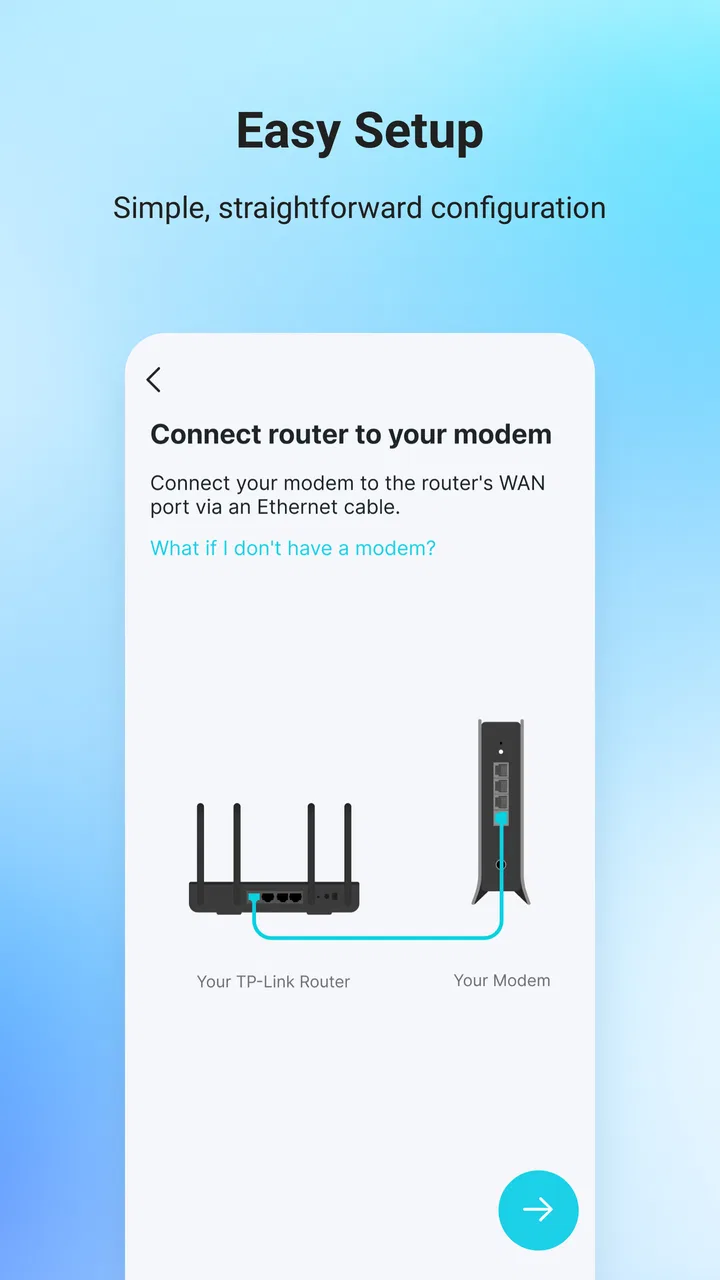
- Quick setup process saves time.
- Secure connection with parental controls.
- Supports multiple TP-Link devices.
- Real-time network status monitoring.
Cons
- Limited features for advanced users.
- Some devices may not be supported.
- Occasional connectivity issues.
- Ads can be intrusive at times.
- Requires internet for full functionality.

TP-Link Tether
Gallery